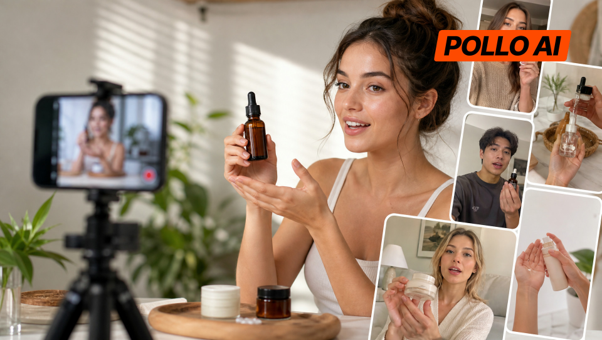
Creating UGC-style product videos for TikTok, Instagram Reels, or an online store can be time-consuming without a dedicated video team. Pollo MCP connects Pollo AI's media tools to compatible AI assistants like GPT-6 Astra and Claude, letting users create and refine natural, creator-style product videos through conversation.
This guide explains how to set up Pollo MCP, create UGC-style product videos, and improve the results before publishing.
Step 1: Connect Pollo MCP to an AI Assistant
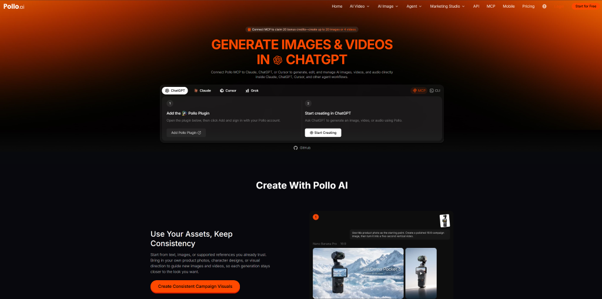
Visit Pollo MCP and select your preferred supported AI assistant.
For GPT-6 Astra, open GPT-6 Astra from the page and install the Pollo MCP plugin. Sign in to your Pollo account if prompted. Other options include Claude, Codex, Cursor, OpenClaw, and Hermes. Follow the setup instructions for your chosen platform.
Once connected, start a conversation and request supported Pollo tools through your prompts.
Step 2: Prepare Your Product Photos and Video Concept
Choose clear product photos and plan how the product will appear. UGC-style videos work best with everyday settings and natural product demonstrations.
For example, a water bottle video could show someone filling it, putting it in a work bag, and using it at a desk. Decide whether you want a creator speaking to the camera, a voiceover, or a visual demonstration.
If the product's shape, color, packaging, or logo must remain consistent, provide reference images and specify this in your prompt.
Step 3: Generate Your UGC-Style Video
Describe the scene, actions, and desired style, then ask the assistant to generate a video through Pollo MCP. For UGC video ads, specify natural gestures, realistic lighting, and relaxed framing to avoid an overly polished commercial look. You can also name a preferred model or ask the assistant to recommend one.
Pollo AI supports video models such as Seedance 2.5, MiniMax H3, Kling 3, Sora 2, Veo 3.1, and Runway Gen-4 Turbo through Pollo MCP. Features vary by model.
Batch generation supports 1–12 image or video tasks, allowing you to test different scenes or styles. Start with a few variations to manage credit usage.
Step 4: Review and Refine the Video
Check product accuracy, natural movement, and whether the result matches your intended UGC style. Look for altered packaging, awkward gestures, or unnatural expressions.
If you spot an issue, ask the assistant to fix that specific problem. You may need clearer references, a simpler scene, or another generation.
Before publishing, check for visual errors and unsupported product claims. Never present AI-generated footage as a genuine customer testimonial.
Tips for Creating Better UGC-Style Videos with Pollo MCP
Write a Clear, Specific Prompt
Specify the setting, product action, camera movement, and details that must remain consistent. For example:
“Create a natural UGC-style product video using these reference photos. Show a person casually demonstrating the product in an everyday setting, with relaxed movements, natural lighting, and a handheld-camera feel. Make it look like authentic creator content, not a polished commercial. Keep the product's original shape, color, packaging, and label consistent. Avoid exaggerated reactions and unsupported claims.”
Refine One Thing at a Time
The first result may not be perfect. Identify issues such as altered packaging or awkward movement, then request specific changes instead of rewriting the entire prompt. If the problem persists, try a different reference image or simplify the scene.
FAQs
What is Pollo MCP?
MCP stands for Model Context Protocol. It connects compatible AI applications to external tools. Pollo MCP uses this connection to give supported AI assistants access to Pollo AI's media generation and editing tools.
Do I need coding skills?
The standard setup for a supported AI assistant follows the connection instructions on the official page. Some developer-focused options may require additional configuration.
Does Pollo MCP cost extra?
Generation tasks use your Pollo account and credits. Costs depend on the task and model, so check the applicable credit requirements before generating multiple versions.
Can it create images and audio, too?
Yes. Pollo MCP provides access to supported image, video, and audio tools, although available features depend on the selected tool or model.
Final Thoughts
If you regularly create product videos for social media or your online store and want to manage prompting, generation, and revisions in one conversation, Pollo MCP is worth trying. It lets you access Pollo AI's creative tools through a supported AI assistant, which can be useful when testing different video ideas or refining a product demo.