
Why Disconnected Finance Workflows Weaken Salesforce Accounting Integration
An Order is ready in Salesforce. The customer details, products, prices, payment terms, and billing address are already there. Yet finance still opens another system, copies the same information, checks the VAT treatment, uploads the invoice file, and prepares the data for DATEV.
This handoff may seem manageable until the transaction changes. What if an invoice line is corrected, part of the invoice is cancelled, a Credit Note is issued, or an attachment is added after transfer? Finance must then confirm that every related record is updated.
The same Account may also have two financial roles. A company can buy services from you and provide services to you. In that case, DATEV may require separate DATEV customer and supplier numbers, even though Salesforce stores the company in one Account record. Manual entry makes it easier for those numbers, document numbers, tax rules, or account assignments to become inconsistent.
Salesforce holds the customer’s commercial history, including the Opportunity, Quote, Order, products, pricing, and communication. DATEV supports accounting and tax work, so using both systems is reasonable.
The weak point is the handoff between them. When the transfer depends on spreadsheets, copied fields, emails, and repeated checks, the same transaction develops two separate histories. Sales may see the latest commercial change in Salesforce, while finance or the tax advisor works with an earlier version in DATEV.
MuleSoft’s 2026 Connectivity Benchmark Report found that 99% of surveyed European enterprises face data integration challenges, while only 29% of their applications are connected. For companies using Salesforce and DATEV, manual handoffs can create fragmented records, repeated checks, and uncertainty about which system contains current information.
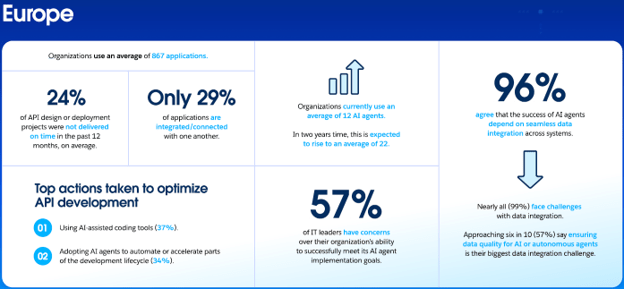
Data integration challenges among surveyed European enterprises. Image source: MuleSoft
Salesforce DATEV integration should preserve the relationship between the source transaction, the financial document, later corrections, supporting files, and the accounting data sent onward. That connection matters because later checks all lead to the same question: which version of the transaction is current?
What DATEV Is and Why It Matters to DACH Finance Teams
DATEV’s strongest role remains in Germany, where company accounting data meets the work of tax advisors, auditors, and public authorities. It also matters to groups with a German legal entity or tax advisory firm.
From 65 Tax Professionals to a Major Finance Platform
DATEV began in 1966, when 65 tax professionals in Nuremberg formed a cooperative to share the cost of computer processing. Its members still include tax advisors, auditors, and lawyers.
Its scale is much larger today. DATEV’s 2025 annual report lists 40,296 members, around 928,000 customers, 9,074 employees, and revenue of about €1.65 billion. These figures help explain why DATEV appears so often in German accounting projects and in the daily collaboration between companies and the professionals who prepare or review their financial records.
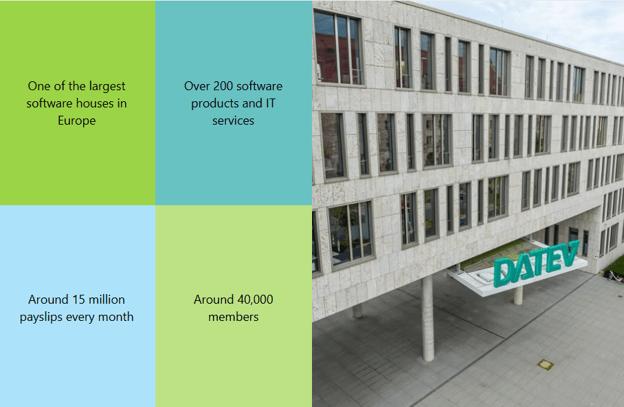
Image source: DATEV
Why Connected Data Fits DATEV’s Direction
DATEV also moved from punched tapes and central data processing to electronic transmission and cloud services. It says its product portfolio will move toward cloud solutions in the coming years, particularly for financial accounting, payroll, and e-invoicing. The aim is to support digital work between tax firms, companies, and public authorities.
For Salesforce users, a DATEV transfer should not be treated as an isolated final step. It is only as accurate as the data prepared before it. Customer records, financial documents, tax treatment, account assignments, and supporting files must remain consistent. The next question is practical: which information should stay in Salesforce, and what needs to move to DATEV?
How the DATEV Salesforce Workflow Moves from Invoice to Posting
The process begins with business data already stored in Salesforce. An Account contains the business partner details, while an Opportunity, Quote, or Order records what was sold, at what price, and under which commercial terms. These records, together with other operational data, provide the source information for an Invoice, Credit Note, cancellation invoice, or self-billing invoice.
Before anything moves to DATEV, the financial document needs its accounting context. The correct legal entity identifies which company issued it. Tax rules determine the VAT treatment, while account assignments and cost centres show how each amount should be recorded. The Account also needs the relevant DATEV customer or supplier number.
| What Stays in Salesforce and What Moves to DATEV | |
| System | Role in the Workflow |
| Salesforce | Stores customer and source records, financial documents, attachments, and linked corrections |
| DATEV | Receives customer or supplier data, document details, amounts, tax data, account assignments, cost center values, posting information, and related files |
Each transfer should remain traceable to the Salesforce document and source transaction.
How to Evaluate a Salesforce Accounting Integration Solution
Before selecting an app or connector, start with the records, documents, and accounting rules the process must support. Creating an Invoice is only one part of the work. The system must also prepare accurate data for DATEV and preserve the connection to the original Salesforce transaction.
Use these questions during the evaluation:
- Which financial documents are supported, including Invoices, Credit Notes, cancellation invoices, partial invoices, and self-billing invoices?
- How are VAT treatment, account assignments, and cost centres determined?
- Can one Account store separate customer and supplier identifiers?
- Can several legal entities use their own company data and number sequences?
- Do attachments and later corrections remain connected to the original document?
- Does the solution support file export, direct transfer, or both?
- Can access be separated between sales, finance, administrators, and read-only users?
- How can users identify and correct incomplete or failed transfers?
Finance users and the tax advisor should review a small set of sample transactions before wider automation begins. This review should compare the Salesforce document with the data received in DATEV, including amounts, tax treatment, account assignments, customer and supplier numbers, and attachments.
When Accounting Software Integrated with Salesforce Fits the Process
This model fits companies whose customer, product, pricing, and billing data already exists in Salesforce. Salesforce billing software may generate the Invoice, but DATEV also needs structured master data, posting information, tax treatment, and supporting documents.
The main goal is to prepare reliable data before the transfer and keep it traceable to the customer, document, and transaction that produced it.
Exploring Salesforce DATEV Workflow Options on AppExchange
At this point, I would move from the checklist to Salesforce’s online marketplace for ready-made business apps, AppExchange (now AgentExchange).
I searched for accounting tools that connect Salesforce documents with DATEV. The results included dedicated connectors as well as apps covering a wider finance process. A connector may transfer data that has already been prepared. A broader app may also manage the documents, tax rules, customer and supplier numbers, attachments, and other information required before that transfer.
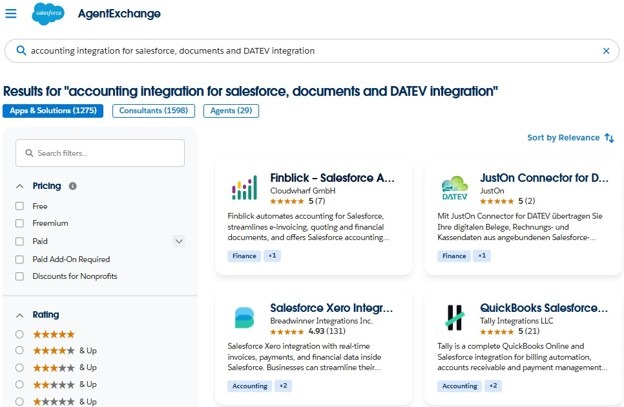
Accounting and DATEV solutions found on AppExchange (now AgentExchange)
For this walkthrough, I needed a solution that could keep Quotes, Orders, Invoices, Credit Notes, tax treatment, customer and supplier numbers, attachments, and the DATEV handoff within one connected process. Finblick by Cloudwharf appeared relevant, so I selected it for the following steps.
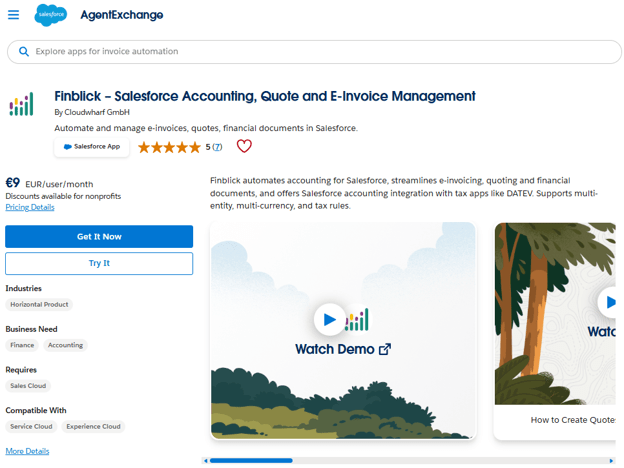
Finblick on AppExchange (now AgentExchange)
It fits this example because financial documents remain connected to Salesforce records. An Invoice can follow a Quote or Order, while later Credit Notes or cancellation invoices remain part of the same document chain. Before transfer, Finblick uses Legal Entities, Tax Rules, account determination, cost center allocation, and separate customer and supplier numbers to prepare the accounting context. Supporting files can also remain attached to the financial document.
Finblick supports file-based export and direct transfer when the company has the required DATEV access. The next section uses the app to show how this workflow can be prepared, checked, and transferred step by step.
Build Accounting Integration with Salesforce Step by Step
Once the tool is selected, the work moves from product comparison to process design. Using Finblick as the example, the setup can be divided into five practical stages.
Step 1: Prepare Salesforce and Assign User Access
Before installation, enable the Salesforce features the app requires: State and Country/Territory Picklists, Quotes, Orders, and Custom Address Fields. Choose Install for Admins Only, then open Finblick Setup and connect the Salesforce environment to the Finblick service.
Next, assign access by role. Read-only users can view records, Sales Users can work with Quotes, and Finance Users can manage Quotes, Orders, Invoices, and Credit Notes. Users responsible for DATEV exports need a DATEV license and the Finblick DATEV User permission set.
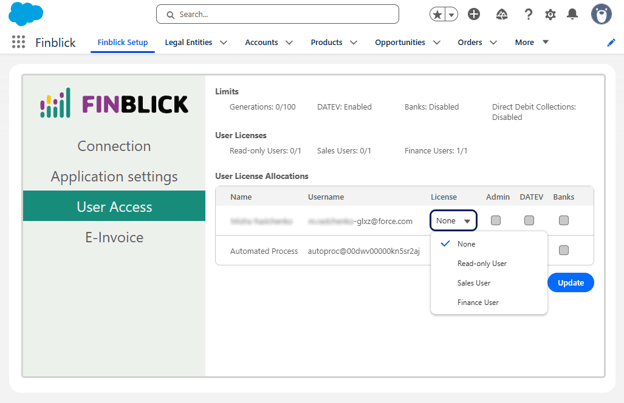
Finblick User Access settings for assigning licenses and DATEV permissions
Step 2: Configure Legal Entities and Master Data
Create a Legal Entity for each company that issues financial documents. Add its company details, document settings, branding, and number sequences. When several entities operate in one Salesforce environment, use different prefixes so their document numbers do not overlap.
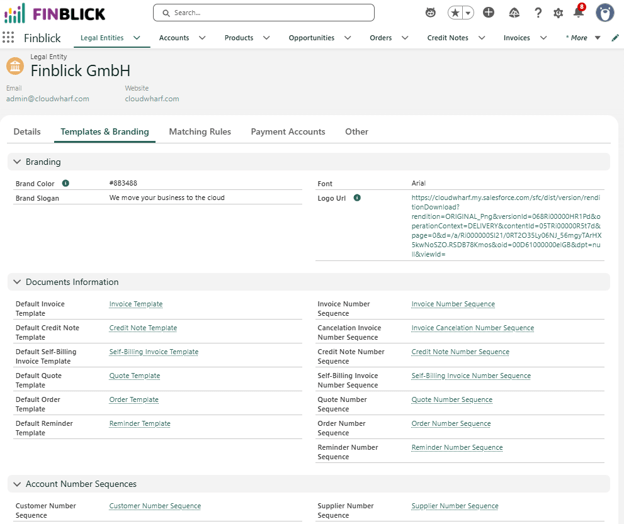
Finblick Legal Entity settings with templates, branding, and number sequences
Decide how the DATEV Customer Number and DATEV Supplier Number fields will be populated. Finblick can generate Customer Numbers and Supplier Numbers when users open the preview of the first applicable document. If those generated values will be used for DATEV, make sure they are copied into the corresponding DATEV fields before export. The same Account can store both values when the company acts as both a customer and a supplier.
Step 3: Define Tax and Account Determination Rules
Configure the Tax Rules that determine the VAT treatment for document lines. Finblick then applies account determination and cost center allocation. It selects the relevant revenue, tax, and offsetting accounts and includes the assigned cost center values in the DATEV data.
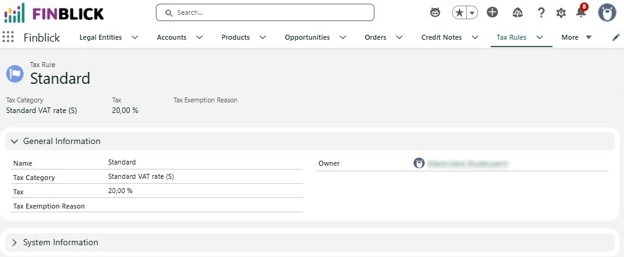
Example of a Finblick Tax Rule record
Do not rely on users to remember the correct treatment for each transaction. Ask finance or the tax advisor to describe the expected treatment for domestic sales, EU transactions, and other scenarios. Then test the rules with sample products, customers, and locations before allowing wider use.
Step 4: Connect the Full Financial Document Flow
Test the records in the order your company expects to use them. Finblick by Cloudwharf supports a Quote-to-Order-to-Invoice process, although an Invoice can also be created directly.
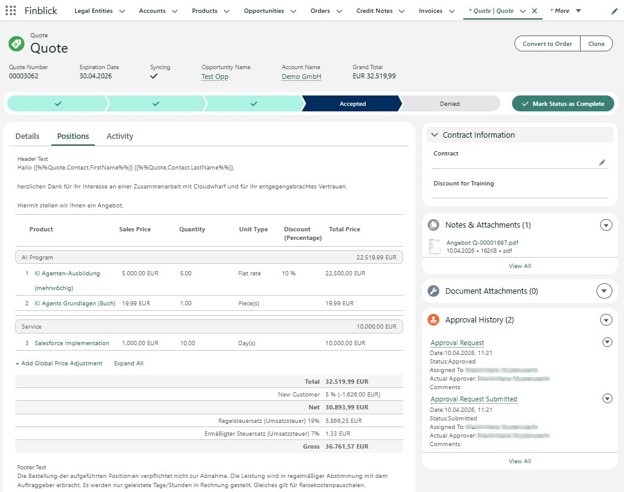
Finblick Quote showing products, discounts, VAT, attachments, and approval status
Include final invoices, down payment invoices, partial invoices, e-invoices, cancellation invoices, Credit Notes, and self-billing invoices. Check that each later document remains linked to the original Salesforce transaction and that its supporting files are stored with the correct record.
Step 5: Choose and Test the DATEV Integration Method
Finblick provides two transfer options. Users can create a DATEV Export record for a selected period and generate a ZIP file containing documents and posting information. They can also send the data directly when the company has the appropriate DATEV login.
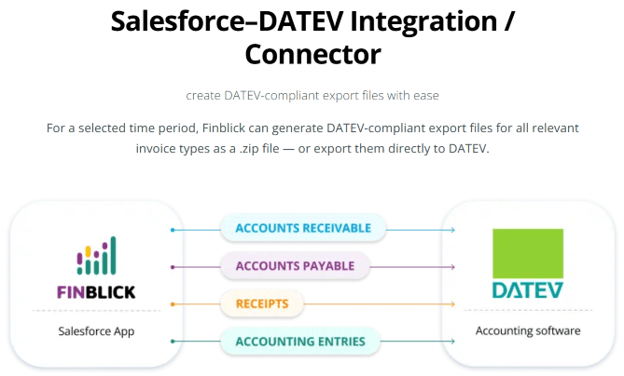
Finblick illustration of financial data moving from Salesforce to DATEV. Image source: Finblick
Begin with a limited set of transactions. Compare the Salesforce documents with the exported document numbers, dates, amounts, taxes, account assignments, cost center values, customer and supplier numbers, and attachments. Ask finance or the tax advisor to confirm the result before increasing the volume or moving to direct transfer.
Keep One Transaction History From Sale to Accounting
Let’s return to the Order from the example at the beginning. The customer details, products, prices, and payment terms already exist in Salesforce. Once the financial document, tax treatment, account assignments, attachments, and later corrections remain linked to that source record, finance no longer has to rebuild the same transaction for each handoff.
- Sales can see which commercial agreement produced the Invoice.
- Finance can review the document chain and confirm what has been prepared for transfer.
- The tax advisor receives structured data with the related files and identifiers.
- When a Credit Note or cancellation invoice follows, the change can still be traced back to the original record.
A connected workflow depends on clear ownership, tested rules, controlled access, and validation before wider use. The result is a single transaction history that remains understandable from the first Quote through accounting, even when the process changes later.